
Find Files Faster.
Turn folder chaos into a visual library. Ufish is the alternative File View and Backup element for busy Designers. Collect, Find, Open. Independent since 2013. Privacy-first.
Get it on
App Store

how it works
Features
Visual Library
Generates full visual previews automatically
Browse
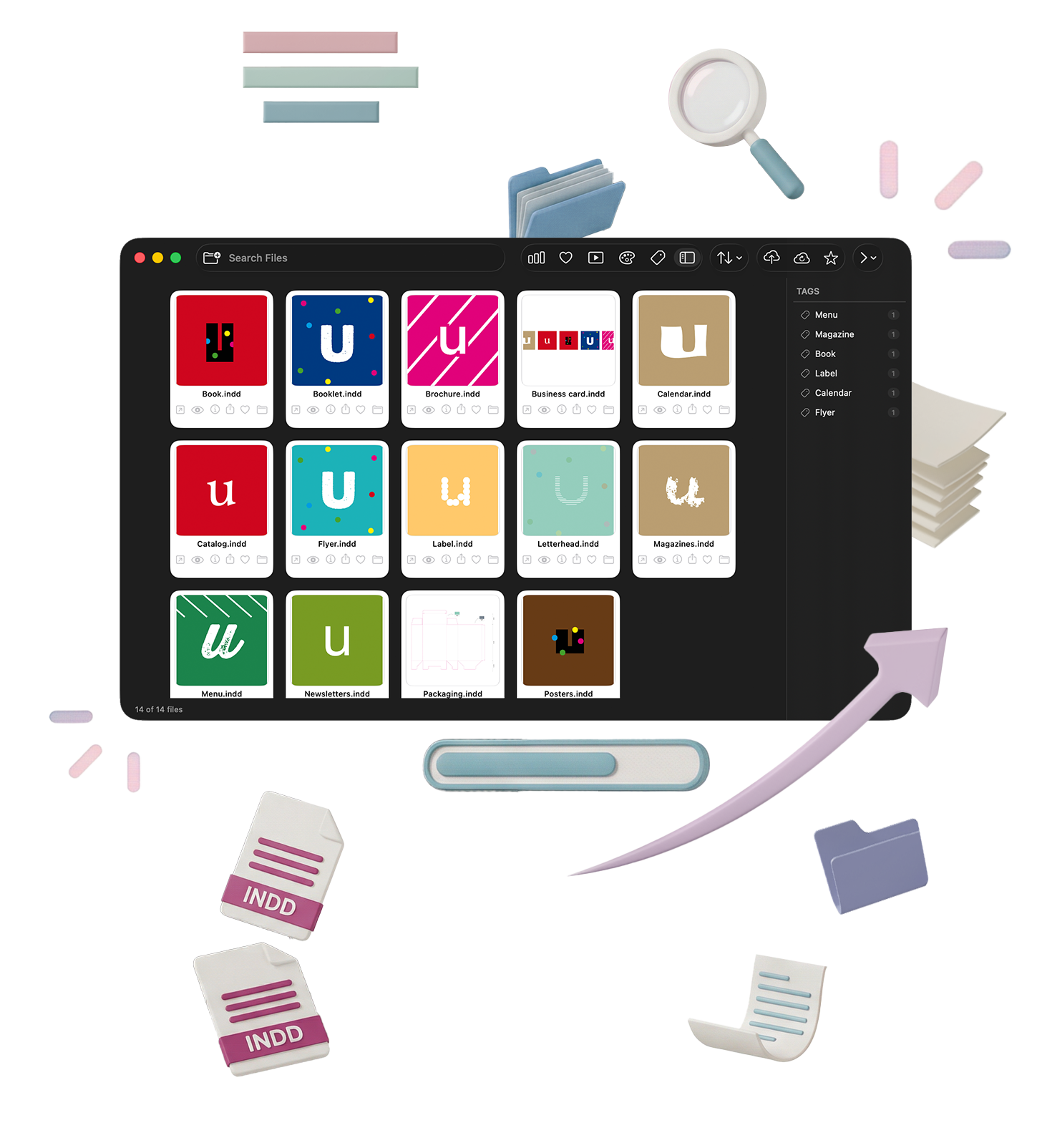
Let's you Browse your entire design library as a clean card grid
Search
Search by file name, tag, or dominant color
Visual Library
Generates full visual previews automatically
Browse
Let's you Browse your entire design library as a clean card grid
Search
Search by file name, tag, or dominant color
SMART Features
Color filter
Filter your library by the dominant color in each preview
Auto-tags
Ufish reads your previews and automatically tags files as Flyer, Poster, Brochure, A4, Business Card, and more
Tag sidebar
Browse and filter by tag in a clean Finder-style panel
File information
See file size, color profile, creation date, and more
Cloud backup
Back up all your previews to iCloud or your preferred cloud provider
Slideshow
• Tag sidebar — browse and filter by tag in a clean Finder-style panel
What it does
Designed for Designers
Ufish is built for graphic designers, art directors, and studios who work with InDesign daily and need a fast, visual way to navigate large file libraries. No more opening files just to remember what's inside.
Works entirely on your Mac. Your files stay yours — Ufish never uploads your data or uses it to train AI models.
Years finding files
Users
Private D.A.M.
Privacy & Safety.
100% Local. Apple Sandbox. Zero cloud. Zero data. Ufish runs inside your Mac — protected by Apple’s sandboxing. We never see, store, or send your InDesign files. No Adobe Cloud. No Dropbox. No cloud sync. Your files stay private.
See it in action.
Add one or more folders — Ufish scans for all .indd files automatically
Build a visual job library with instant thumbnails
Search by name or date, filter favourites
Open files directly in InDesign — or reveal the folder in Finder
View file details: size, date, fonts, colour mode, dimensions
Preview in large view or slideshow for client reviews
Send clean bitmap previews to clients or team
Select multiple files and launch a slideshow for quick reviews
Track stats: total files, favourites, size, newest/oldest
Reset & re-import anytime — no permanent data
Free
$ 0
Advanced Analytics
Customer Support
Collaboration Tools
SSL Encryption
Unlimited Users
Starter
$ 2.99
Advanced Analytics
Customer Support
Collaboration Tools
SSL Encryption
Unlimited Users

PRO
$ 8.99
Advanced Analytics
Customer Support
Collaboration Tools
SSL Encryption
Unlimited Users
Pricing
Duis aute irure dolor in reprehenderit in voluptate velit esse.
Free
Standard
PRO
Advanced Slideshows
10 Pages
20 Pages
Unlimited
High-Res Preview
10 Pages
20 Pages
Unlimited
File indexing

Sub-recursive indexing
Search and exclude words
Auto-tag mode
Collaboration Tools
Privacy through Apple Sandbox
Favorites selection
Search by color
Search by date
Indexing up to 50 files
Indexing up to 100 files
Unlimited indexing
Preview viewing
HD preview viewing
Preview slideshow
Advanced slideshow options
Share previews with one tap
Share previews by email
Secure preview backup
2 TB backup storage
SSL Encryption
Unlimited Users
Price
For $ 30
For $ 40
For $ 50
Frequently Asked Questions(FAQ)
DO NOT DELETE
Your content goes here. Edit or remove this text inline or in the module Content settings. You can also style every aspect of this content in the module Design settings and even apply custom CSS to this text in the module Advanced settings.
1. Does Ufish automatically generate thumbnails for my InDesign files?
A: Yes. Ufish automatically generates thumbnails from an added folder or disk.
DO NOT DELETE
Your content goes here. Edit or remove this text inline or in the module Content settings. You can also style every aspect of this content in the module Design settings and even apply custom CSS to this text in the module Advanced settings.
2. How does search work in Ufish?
A: Search is powered by filenames, auto-generated tags, metadata, and even OCR (text recognition) from your InDesign previews — making it easy to find any project instantly. You can view your file previews and find the work you need visually.
DO NOT DELETE
Your content goes here. Edit or remove this text inline or in the module Content settings. You can also style every aspect of this content in the module Design settings and even apply custom CSS to this text in the module Advanced settings.
3. Can Ufish open InDesign files directly?
A: Ufish can point the file to be opened by InDesign or reveal it in Finder for quick navigation.
DO NOT DELETE
Your content goes here. Edit or remove this text inline or in the module Content settings. You can also style every aspect of this content in the module Design settings and even apply custom CSS to this text in the module Advanced settings.
4. Is Ufish only for InDesign files?
A: Currently, yes. This version is built for Adobe InDesign, but other versions will be available soon.
DO NOT DELETE
Your content goes here. Edit or remove this text inline or in the module Content settings. You can also style every aspect of this content in the module Design settings and even apply custom CSS to this text in the module Advanced settings.
5. What kind of app is Ufish?
A: Ufish is a macOS desktop app built specifically for creative professionals who need to manage visual libraries of projects.
Send your kudos or comments to askme@ufish.pt. Include a description of your issue and attach any relevant screenshots to help us understand the problem better. We value your feedback.
